> For the complete documentation index, see [llms.txt](https://docs.gremsy.com/llms.txt). Markdown versions of documentation pages are available by appending `.md` to page URLs; this page is available as [Markdown](https://docs.gremsy.com/payloads/zio/general.md).

# GENERAL

Zio Payloads

## Overview

Zio is a high-resolution zoom payload that combines a Sony sensor with high-stabilized three-axis gimbal technology. It enables industrial inspectors and surveyors to zoom into objects of interest and effortlessly transmit video at 4K resolution, ready to be utilized for a variety of different inspection, surveying, and public safety jobs.

## In the box

<figure><img src="https://3309772875-files.gitbook.io/~/files/v0/b/gitbook-x-prod.appspot.com/o/spaces%2FnikHUDUd2JXqkOsnOi7l%2Fuploads%2F8nvfFTogaB8TZJP3c1iN%2FFULL%20BOX%20ZIO_0811.bip.169.png?alt=media&amp;token=742b7a01-8089-4c69-b8f6-57cdb975485f" alt=""><figcaption></figcaption></figure>

<table><thead><tr><th width="165" align="center">No.</th><th align="center">Item</th><th width="130.33333333333331" align="center">Quantity</th></tr></thead><tbody><tr><td align="center">1</td><td align="center">Zio Payload</td><td align="center">1</td></tr><tr><td align="center">2</td><td align="center">Zio Damping</td><td align="center">1</td></tr><tr><td align="center">3</td><td align="center">Zio Quick Release</td><td align="center">1</td></tr><tr><td align="center">4</td><td align="center">Allen key 2mm</td><td align="center">1</td></tr><tr><td align="center">5</td><td align="center">Allen key 2.5mm</td><td align="center">1</td></tr><tr><td align="center">6</td><td align="center">M3 x 6 Hexagon Screw Bolt Cut Head</td><td align="center">4</td></tr><tr><td align="center">7</td><td align="center">M3 x 6 Hexagon Screw Flat Head</td><td align="center">4</td></tr><tr><td align="center">8</td><td align="center">USB Type A to USB Type C Cable</td><td align="center">1</td></tr><tr><td align="center">9</td><td align="center">Micro USB Cable</td><td align="center">1</td></tr><tr><td align="center">10</td><td align="center">Zio Control Cable</td><td align="center">1</td></tr><tr><td align="center">11</td><td align="center">Zio Power Cable</td><td align="center">2</td></tr><tr><td align="center">12</td><td align="center">Micro SD Card SDXC I, 64GB</td><td align="center">1</td></tr></tbody></table>

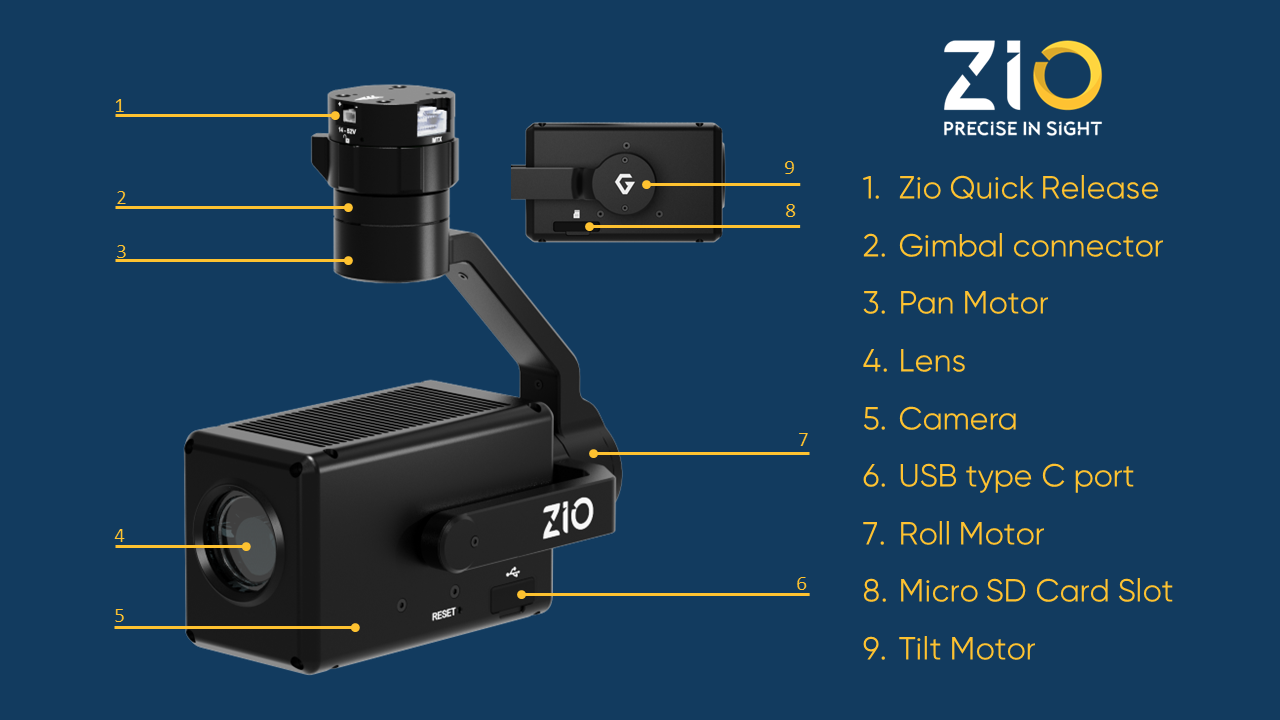
## Components

<figure><img src="https://3309772875-files.gitbook.io/~/files/v0/b/gitbook-x-prod.appspot.com/o/spaces%2FnikHUDUd2JXqkOsnOi7l%2Fuploads%2F5mV14juk0jJBuAV0KidB%2FComponents.png?alt=media&amp;token=21f8dcf6-3c8b-4d02-a5ea-b948b87aa1e9" alt=""><figcaption></figcaption></figure>

## Overview Diagram

<figure><img src="https://3309772875-files.gitbook.io/~/files/v0/b/gitbook-x-prod.appspot.com/o/spaces%2FnikHUDUd2JXqkOsnOi7l%2Fuploads%2FFK5REzqKprwai38TJ8GB%2Fimage.png?alt=media&amp;token=4165c714-4680-4c4f-b567-910b303663d1" alt=""><figcaption></figcaption></figure>

## Specification

### General

<table data-header-hidden><thead><tr><th width="286"></th><th></th></tr></thead><tbody><tr><td>Payload Dimensions (DxWxH)</td><td>145mm × 90mm × 148mm</td></tr><tr><td>Weight</td><td>480g (1.06 lbs)</td></tr><tr><td>Input Voltage</td><td>14.5V - 52V</td></tr><tr><td>Power Consumption</td><td>12W-48W</td></tr><tr><td>Connections</td><td>USB 2.0, UART, Ethernet, Micro HDMI</td></tr><tr><td>Remote Software</td><td>QGroundControl</td></tr><tr><td>Streaming Video</td><td><ul><li>HDMI output: 1080p60 (1920x1080 | 60fps)</li><li>Ethernet output: 720p60 (1280x720 | 30fps)</li></ul><p>Video Bit Rate is adjustable</p></td></tr><tr><td>Storage Temperature</td><td>32° F ~ 122° F (0° C ~ 50° C)</td></tr><tr><td>Operating Temperature</td><td>32° F ~ 122° F (0° C ~ 50° C)</td></tr><tr><td>Compatible Drones</td><td><p>Drone supported by PX4 and Ardupilot</p><ul><li>Recommended FC: Cube</li></ul></td></tr></tbody></table>

### Gimbal

<table data-header-hidden><thead><tr><th width="290"></th><th></th></tr></thead><tbody><tr><td>Angular Vibration Range</td><td>±0.01°</td></tr><tr><td>Gimbal Mount</td><td>Bottom mount (Detachable)</td></tr><tr><td>Controllable Range</td><td><ul><li>Tilt: ±120°</li><li>Pan: ±320°</li></ul></td></tr><tr><td>Mechanical Range</td><td><ul><li>Tilt: +138° to -198°</li><li>Pan: ±335°</li><li>Roll: +75° to -265°</li></ul></td></tr><tr><td>Max Controllable Speed</td><td><ul><li>Tilt: 100°/s</li><li>Pan: 100°/s</li></ul></td></tr><tr><td>Working Current:</td><td><ul><li>Static current: 1.0A (@12V)</li><li>Dynamic current: 1.5A (@12V)</li><li>Locked motor current: Max 4.0A (@12V)</li></ul></td></tr></tbody></table>

### Camera

<table data-header-hidden><thead><tr><th width="291"></th><th></th></tr></thead><tbody><tr><td>Sensor</td><td>1/2.5" Exmor R CMOS</td></tr><tr><td>Effective Pixels</td><td>8.51 MP</td></tr><tr><td>Zoom</td><td><ul><li>Optical: 20x</li><li>Digital: 12x</li><li>Super Resolution: 30x</li><li>Combine: 240x (recommend for photography only)</li></ul></td></tr><tr><td>Camera Lens</td><td>f/2.0 to f/3.8 (4.4 to 88.4mm Equivalent)</td></tr><tr><td>FOV</td><td><ul><li>Wide: 72°</li><li>Telephoto: 4.1°</li></ul></td></tr><tr><td>Resolution</td><td><ul><li>Photo: 3840 x 2160</li><li>Video: 3840 x 2160 @ 30 fps | 1920 x 1080 @ 30fps</li></ul></td></tr><tr><td>Aspect Ratio</td><td>Photo: 16:9</td></tr><tr><td>Format</td><td><ul><li>Photo: JPEG</li><li>Video: MP4</li></ul></td></tr><tr><td>Defog mode</td><td>On/Off (Low, Mid, High)</td></tr><tr><td>White Balance</td><td>Auto, Indoor, Outdoor</td></tr><tr><td>Shutter Speed</td><td>1/30 to 1/2000s</td></tr><tr><td>Exposure mode</td><td>Auto, Shutter speed, Iris, Bright, Manual</td></tr><tr><td>Zoom mode</td><td>Combine, Separate, Super Resolution</td></tr><tr><td>Storage</td><td>MicroSDXC I (a 64GB SD card included)</td></tr></tbody></table>


---

# Agent Instructions
This documentation is published with GitBook. GitBook is the documentation platform designed so that both humans and AI agents can read, navigate, and reason over technical content effectively. Learn more at gitbook.com.

## Querying This Documentation
If you need additional information that is not directly available in this page, you can query the documentation by asking a question.

Perform an HTTP GET request on the following URL with the `ask` and `goal` query parameters:

```
GET https://docs.gremsy.com/payloads/zio/general.md?ask=<question>&goal=<user_goal>
```

`ask` is the immediate question: it should be specific, self-contained, and written in natural language.
`goal` is what the user is ultimately trying to achieve, the reason they need the answer. Sharing it helps GitBook give you a better, more relevant answer. A goal is most helpful when it describes the outcome the user wants rather than restating the question. For example, with `ask=how do I create an API token`, a goal like `automate deployments from our CI pipeline` lets GitBook tailor the answer to that use case.

The response will contain a direct answer to the question and relevant excerpts and sources from the documentation.

Use this mechanism when the answer is not explicitly present in the current page, you need clarification or additional context, or you want to retrieve related documentation sections.