> For the complete documentation index, see [llms.txt](https://docs.gremsy.com/llms.txt). Markdown versions of documentation pages are available by appending `.md` to page URLs; this page is available as [Markdown](https://docs.gremsy.com/gimbals/pixy-u/app-and-firmware.md).
# APP & FIRMWARE
### **Q 1:** What’s new?
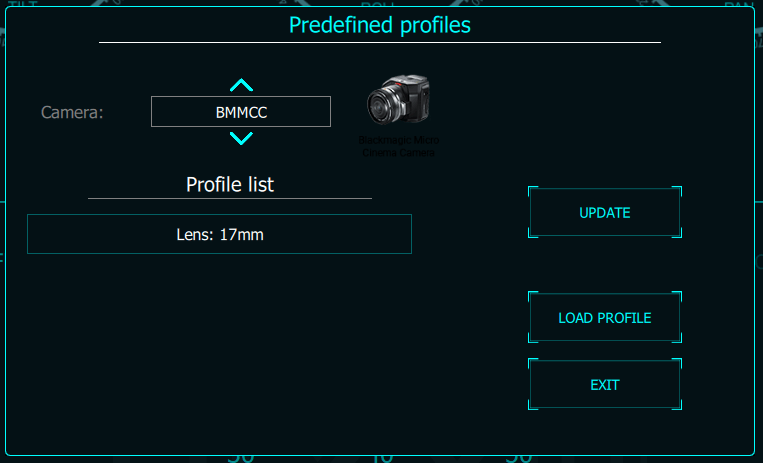
* The camera settings profile is available for your reference
 ### **Q 2:** What application/software do Gremsy gimbals use?
* Gremsy developed gTune app & software to configure gimbals.
### **Q 3:** What are general good practices while using the gTune?
* Before running gTune mobile app, make sure to connect with the gimbal’s Bluetooth. Otherwise, the app can’t connect to the gimbal properly.
* Firmware upgrading procedure with gTune Desktop software: Before upgrading, please temporarily unplug the receiver (if available). Otherwise, you will be stuck on erasing step and can not get it completed. Of course, the software will remind you but it’s better to do it yourself first.
### **Q 4:** How can I save profiles?
* In the Stiffness configuration activity/screen, a save icon can be found in the top right corner. Tap this icon and enter your profile name, then tap Save to finish. To load a profile, go to main activity, select Profile menu to view and load desired profile.
### Q 5: How do I update firmware?
**Notes:** Make sure you installed the Driver for USB before continuing below steps:
**Before upgrade:**
* Download the latest Software version for MAC or Windows if it’s not installed yet.
* Install USB Driver if it’s not installed yet.
* Download the Firmware in Zip format.
* Unzip to get the \*.hex file.
* Unplug Remote Receiver (SBUS, JR, …) if it was plugged to gimbal.
* Connect to your Mac or PC.
**During upgrade:**
* Power on.
* Run the software and select Upgrade.
* Follow Steps on the screen.
**After upgrade:**
### **Q 2:** What application/software do Gremsy gimbals use?
* Gremsy developed gTune app & software to configure gimbals.
### **Q 3:** What are general good practices while using the gTune?
* Before running gTune mobile app, make sure to connect with the gimbal’s Bluetooth. Otherwise, the app can’t connect to the gimbal properly.
* Firmware upgrading procedure with gTune Desktop software: Before upgrading, please temporarily unplug the receiver (if available). Otherwise, you will be stuck on erasing step and can not get it completed. Of course, the software will remind you but it’s better to do it yourself first.
### **Q 4:** How can I save profiles?
* In the Stiffness configuration activity/screen, a save icon can be found in the top right corner. Tap this icon and enter your profile name, then tap Save to finish. To load a profile, go to main activity, select Profile menu to view and load desired profile.
### Q 5: How do I update firmware?
**Notes:** Make sure you installed the Driver for USB before continuing below steps:
**Before upgrade:**
* Download the latest Software version for MAC or Windows if it’s not installed yet.
* Install USB Driver if it’s not installed yet.
* Download the Firmware in Zip format.
* Unzip to get the \*.hex file.
* Unplug Remote Receiver (SBUS, JR, …) if it was plugged to gimbal.
* Connect to your Mac or PC.
**During upgrade:**
* Power on.
* Run the software and select Upgrade.
* Follow Steps on the screen.
**After upgrade:**
* Disconnect and connect again to reset the controller.
* Go to CONFIG –> EXPERT –> set DEFAULT –>WRITE
### **Q 6:** Where do I have the latest firmware?
* The latest firmware is updated on our website at [**https://support.gremsy.com**](https://support.gremsy.com/) or please follow us at [**GitHub**](https://github.com/Gremsy) to keep updated and get previous versions if needed.
---
# Agent Instructions
This documentation is published with GitBook. GitBook is the documentation platform designed so that both humans and AI agents can read, navigate, and reason over technical content effectively. Learn more at gitbook.com.
## Querying This Documentation
If you need additional information that is not directly available in this page, you can query the documentation dynamically by asking a question.
Perform an HTTP GET request on the current page URL with the `ask` query parameter:
```
GET https://docs.gremsy.com/gimbals/pixy-u/app-and-firmware.md?ask=
```
The question should be specific, self-contained, and written in natural language.
The response will contain a direct answer to the question and relevant excerpts and sources from the documentation.
Use this mechanism when the answer is not explicitly present in the current page, you need clarification or additional context, or you want to retrieve related documentation sections.